
This guide explains how to publish a Magento 2 extension to GitHub using the web interface and then distribute it via Composer through Packagist.
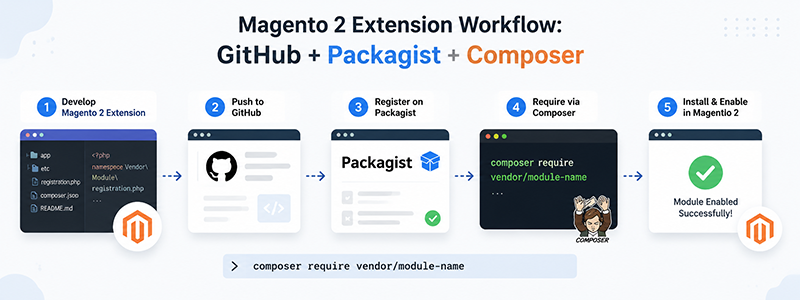
1. Prepare composer.json for Magento 2 Extension
In the root directory of your Magento 2 extension, you must include a composer.json file so Composer can recognize the package.
{
  "name": "yourname/module-example",
  "description": "Magento 2 custom extension",
  "type": "magento2-module",
  "version": "1.0.0",
  "license": "MIT",
  "require": {
    "php": ">=7.4"
  },
  "autoload": {
    "files": [
      "registration.php"
    ],
    "psr-4": {
      "YourName\\ModuleExample\\": ""
    }
  }
}
Key Fields Explanation
- name: Package name used in Composer (e.g. yourname/module-example)
- type: Must be
magento2-module - version: Extension version (can also be managed via Git tags)
- autoload: Defines how Magento loads the module
2. Upload Extension to GitHub Using Web Interface
Step 1: Create a Repository
Go to GitHub and create a new repository.
- Repository name: magento2-module-example
- Description: Magento 2 custom extension
- Visibility: Public or Private
- Do not initialize with README if you already have code
Step 2: Upload Source Code
After creating the repository, click Add file → Upload files. Then drag and drop your entire Magento module into the browser.
Make sure you keep the correct module structure:
- registration.php
- composer.json
- etc/module.xml
- All other module files
Step 3: Commit Changes
- Commit message: Initial release
- Select: Commit directly to main branch
- Click Commit changes
3. Create a Version Tag
Composer uses Git tags to determine version releases. You can create tags in GitHub under the Releases or Tags section.
Example versions:
- 1.0.0
- 1.0.1
- 1.1.0
4. Publish to Packagist
Packagist is the official Composer package repository.
Go to https://packagist.org/ and submit your GitHub repository.
Example repository URL:
https://github.com/yourname/magento2-module-examplePackagist will automatically read composer.json and Git tags to generate package versions.
5. Install Extension via Composer
Once published, install the module using Composer:
composer require yourname/module-exampleOr install a specific version:
composer require yourname/module-example:^1.06. Enable Module in Magento
bin/magento module:enable YourName_ModuleExample
bin/magento setup:upgrade
bin/magento cache:flush