
Magento 2 provides a powerful eCommerce platform for businesses that need flexible payment solutions. However, integrating a specific payment gateway such as eProcessing Network (ePN) requires a dedicated payment extension that can connect Magento checkout with the gateway API securely and reliably.
eProcessing Network Magento 2 integration allows merchants to accept credit card payments directly on their Magento store while supporting essential payment operations such as authorization, capture, void, and refund.
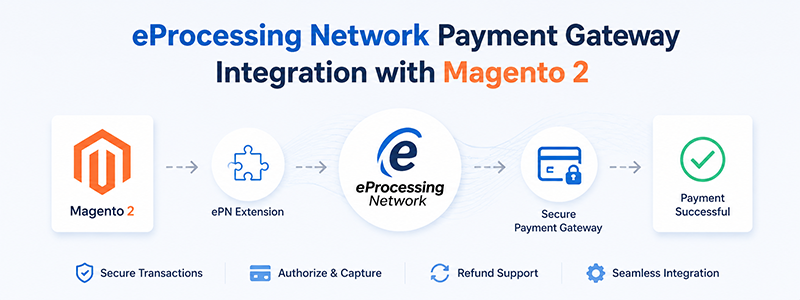
In this guide, we will explain how to integrate eProcessing Network Payment Gateway with Magento 2, how the payment flow works, and what features a Magento 2 ePN extension should provide for a professional implementation.
What is eProcessing Network Payment Gateway?
eProcessing Network (ePN) is an online payment gateway that enables merchants to process credit card transactions securely through their eCommerce websites.
The gateway provides API-based payment processing capabilities, allowing Magento stores to communicate directly with the payment provider for transaction processing.
Typical eProcessing Network transactions include:
- Credit card authorization
- Payment capture
- Transaction cancellation
- Refund processing
- Transaction status checking
For Magento 2 merchants, integrating eProcessing Network provides an alternative payment solution for businesses that require a direct credit card payment method.
Why Integrate eProcessing Network with Magento 2?
Magento 2 supports many payment methods, but merchants often need a payment gateway that matches their business requirements, including:
- Existing merchant account compatibility
- Lower transaction fees
- Direct credit card processing
- Custom payment workflows
- Better control over transaction management
An eProcessing Network Magento 2 extension helps merchants connect their Magento checkout system with ePN without building the entire payment integration from scratch.
Accept Credit Card Payments Directly
Customers can enter their card information during checkout and complete payment without leaving the Magento store.
This creates a smoother checkout experience and can reduce cart abandonment.
Support Magento Payment Operations
A complete ePN Magento 2 integration should support Magento's standard payment workflow:
- Authorize
- Capture
- Void
- Refund
This allows store administrators to manage transactions directly from Magento Admin.
Secure Payment Processing
A professional Magento 2 payment gateway integration should follow Magento security standards:
- Secure API communication
- Encrypted payment requests
- No unnecessary storage of sensitive card information
- Proper transaction validation
How Does Magento 2 eProcessing Network Integration Work?
The payment flow usually follows these steps:
Customer places order
        |
        ↓
Magento 2 Checkout
        |
        ↓
eProcessing Network Payment Extension
        |
        ↓
ePN API Request
        |
        ↓
Payment Gateway Processing
        |
        ↓
Transaction Response
        |
        ↓
Magento Order Update
The extension acts as a bridge between Magento 2 and the eProcessing Network API.
Magento 2 eProcessing Network Integration Methods
There are several possible approaches when integrating ePN with Magento 2.
Direct API Integration
With direct API integration, Magento communicates directly with eProcessing Network.
The process:
- Customer enters payment information.
- Magento creates a transaction request.
- The extension sends the request to ePN API.
- ePN processes the payment.
- Magento receives the transaction response.
- Order status is updated.
Advantages:
- Better checkout experience
- Customer remains on the store website
- Full control over transaction handling
Redirect Payment Integration
Another approach is redirect-based payment.
The customer is redirected to an external payment page hosted by the payment provider.
Advantages:
- Easier PCI compliance management
- Less sensitive payment data handled by the website
Disadvantages:
- Additional checkout step
- Less control over user experience
Installing eProcessing Network Magento 2 Extension
Before installation, make sure your Magento environment meets the requirements:
- Magento 2.x
- Supported PHP version
- Active eProcessing Network merchant account
- API credentials
Upload Extension Files
Copy the extension files into:
app/code/
Example Magento module structure:
app/code/Polacin/EprocessingNetwork/
Enable Magento Module
php bin/magento module:enable Polacin_EprocessingNetwork
Upgrade Magento Database
php bin/magento setup:upgrade
Compile Magento Dependency Injection
php bin/magento setup:di:compile
Clear Magento Cache
php bin/magento cache:flush
Configuring eProcessing Network in Magento 2
Navigate to:
Magento Admin
→ Stores
→ Configuration
→ Sales
→ Payment Methods
Locate:
eProcessing Network Payment Gateway
Enable Payment Method
Set:
Enabled = Yes
Configure API Credentials
Enter:
- Merchant ID
- Username
- Transaction Key
- API credentials provided by eProcessing Network
Transaction Mode
Authorize Only
Magento sends authorization requests. Payment capture happens later.
Suitable for:
- Custom fulfillment workflows
- Physical products requiring manual review
Authorize and Capture
Payment is captured immediately.
Suitable for:
- Standard online stores
- Digital products
Testing eProcessing Network Magento 2 Integration
Before launching, merchants should test all transaction scenarios.
Test Authorization
- Verify transaction request is accepted
- Check order creation
- Confirm payment status updates correctly
Test Capture
- Invoice creation
- Captured amount
- Transaction record
Test Refund
- Refund request reaches ePN
- Magento updates order status
- Credit memo works correctly
Common eProcessing Network Magento 2 Integration Issues
Payment Transaction Failed
Possible causes:
- Incorrect API credentials
- Invalid merchant account configuration
- API communication issue
Solutions:
- Verify ePN account settings
- Check Magento logs
- Test API credentials
Order Created but Payment Failed
Possible causes:
- Incorrect response handling
- Transaction validation problem
Review Magento payment logs and gateway responses to identify the issue.
Refund Not Working
Possible causes:
- Extension does not implement refund command
- Gateway API permission issue
A complete Magento 2 ePN extension should support Magento refund workflow.
Choosing the Right eProcessing Network Magento 2 Extension
When selecting an ePN integration solution, merchants should consider:
Magento Payment Gateway Compatibility
The extension should follow Magento 2 payment architecture instead of using a custom checkout workaround.
Transaction Management
Important features include:
- Authorization
- Capture
- Refund
- Void
- Transaction history
Multi-store Support
Magento merchants running multiple stores need a payment solution that supports Magento multi-store configuration.
eProcessing Network Magento 2 Extension by Polacin
Polacin provides an eProcessing Network Payment Gateway extension for Magento 2 that helps merchants integrate ePN payment processing into their Magento stores.
Learn more about the extension:
eProcessing Network Payment Gateway Magento 2 Extension
- Magento 2 native payment integration
- Credit card payment processing
- Authorization and capture support
- Refund support
- Secure API communication
- Multi-store compatibility