
Westpac PayWay API & PayWay Net Hosted Payment Page - M1
Screenshots


Key Benefits
Overview
Westpac PayWay API & PayWay Net Hosted Payment Page - Magento 1 allows you to use Westpac PayWay API as a credit card processor, using their fully integrated API process. The extension is able to used for Westpac PayWay and StGeorge PayWay
You can process Visa and Mastercard by default, and can optionally accept American Express, Diners Club and JCB after further activation by Westpac
The PayWay solution allows customers to process credit cards using an Application Programming Interface (API). All communications between the customer's system and API takes place securely.
It's easily set up from Magento admin panel

Payment Options:
Westpac PayWay Net Hosted Payment Page: Redirect to the PayWay website for credit card entry, then redirect back to your confirmation page once successful.
Westpac PayWay Classic Credit Card API: It allows your customer to purchase directly from your site using Credit Cards.
Featues of Westpac PayWay Net Hosted Payment Page
- Payment pages hosted by PayWay
- Accept credit cards and PayPal®
- Receive an email when each payment is processed
- Protect yourself with Fraud Guard and 3D secure V2
- Encrypted the payment credentials
- Capture New Sales
- Create Invoice Automatically
- Refund Offline
- Allow you to use your payment logo at checkout page
- Allow for your shopping cart details to be securely displayed on a Hosted Payment Page
- Support multiple websites
- Support multiple store views
- Unlimited domains
Features of Westpac PayWay Classic Credit Card API
- Capture New Sales
- Support Authorize
- Support Capture Online
- Support Refund Online
- Support Full/Partial Refund
- Create Invoice Automatically
- Support Prefix Order Number
- Encrypted the payment credentials
- Support SSL Certificate
- Support multiple websites
- Support multiple store views
- Unlimited domains
Requirements
An active PayWay merchant account, with access to the administration tool
A trusted SSL certificate
AUD as your payment currency
Installation
1) copy files from pl-payway-m1 folder to the magento root folder (It looks like app/code/local/PL/Payway)
2) log in as admin and refresh all caches (System > Cache Management)
3) log out of admin panel and log in back. This is needed for Magento to update access permissions.
Installation is completed.
Troubleshooting
If you will have any issues with the extension, please disable the extension the following way:
1. Open file app/etc/modules/PL_Payway.xml, find this line of code:
<active>true</active>
and change it to:
<active>false</active>
2. log in as admin and refresh all caches (System > Cache Management)
PayWay Classic Credit Card API Installation
Log in to PayWay.
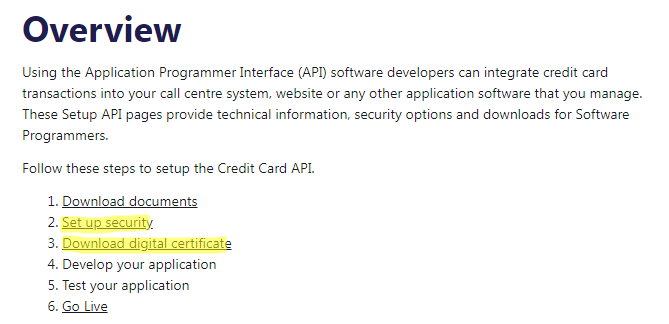
Go to Settings -> PayWay Classic API -> Setup Security. This page will provide you with the username and password to enter into the extension configuration.
- Add the IP address for your server to the access list

Go to Settings -> PayWay Classic API -> Download Digital Certificate.
Set "Choose your API Technology" to "PHP" and click "Go".
Click "Download PHP Certificate" to download ccapi.pem file.
Put this ccapi.pem file to app/code/local/PL/Payway/Model/Api

PayWay Net Hosted Payment Page Installation
Log in to PayWay.
Go to Settings -> PayWay Net -> Setup Hosted Payment Page
Choose "Bill Payments/Shopping Cart - secure shopping cart handoff" then click on the Next buttons, you will get a Biller Code, Username, Password and Encryption Key.
- At the Security Information page, you need to whitelist your Server IP

Test Environment
In case you need to see the demo of Westpac PayWay API & PayWay Net Hosted Payment Page extension for Magento 1, please feel free to contact us or sales@polacin.com
Test Card Numbers
Visa: 4564710000000004 - Expiry: 02/29 - CVN: 847
Master: 5163200000000008 - Expiry: 08/30 - CVN: 070
Amex: 376000000000006 - Expiry: 06/30 - CVN: 2349
Diners: 36430000000007 - Expiry: 06/22 - CVN: 348
Release Notes
Version 2.1.0
Released on October 26, 2022
- Compatible with Westpac PayWay and StGeorge PayWay
- Stability improvements
Version 2.0.4
Released on September 5, 2019
- Added payment notification email for customer
- Hided the fields if payment method is disabled from Configuration section
- Stability improvements
Version 2.0.3
Released on June 5, 2018
- Encrypted Password and Encryption Key from Configuration section
- Restore cart if payment is failed
Version 2.0.2
Released on April 18, 2018
- Bug fixes and stability improvements
Version 2.0.1
Stable version. Released on October 20, 2016
Customer Reviews
-
Instant support via skype
Nice extension, works perfect for WESTPAC REST API. Support is instant without any delay via skyple. love your work. Thanks!Review by Renhai (Posted on 8/23/2018) -
Grate Support
This support is grate and helpful support team. It's give guide very fast and easy way for configuration Payway.
Thanks for your grate support.
Thank You.Review by Kaushik (Posted on 8/23/2017)

