
PayWay REST API - Net - Trusted Frame - M1
Screenshots





Key Benefits
Overview
PayWay REST API & Net - Magento 1 allows you to use PayWay as a credit card processor, using their fully integrated API process. You can process Visa and Mastercard by default, and can optionally accept American Express, Diners Club and JCB after further activation by the Merchant Provider.
The extension included 4 options:
PayWay API: Collect and proccess credit card details directly in your website throguh API Service
PayWay Net: Redirect to PayWay Website for credit card entry, then redirect back to your website
PayWay REST API (NEW): Keep your customer on your site during the entire checkout process.
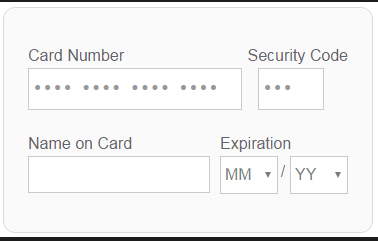
PayWay Trusted Frame (NEW): Using directly PayWay payment form on your site. It looks like below screenshot
Features:
Support PayWay API
Support Payway Net (Hosted Payment Page)
Support Payway Trusted Frame
Support Refund Online (for PayWay API)
Capture New Sales
Create Invoice Automatically
Support Prefix Order Number for Payway Gateway
Installation
1) copy files from pl-payway-m1 folder to the magento root folder (It looks like app/code/local/PL/Payway)
2) log in as admin and refresh all caches (System > Cache Management)
3) log out of admin panel and log in back. This is needed for Magento to update access permissions.
Installation is completed.
Troubleshooting
If you will have any issues with the extension, please disable the extension the following way:
1. Open file app/etc/modules/PL_Payway.xml, find this line of code:
<active>true</active>
and change it to:
<active>false</active>
2. log in as admin and refresh all caches (System > Cache Management)
Payway API Installation
- Install extension from extension package.
- Create var/log/ directory and make it world writable.
- Log in to PayWay.
- Go to Setup API -> Security. This page will provide you with the username and password to enter into the extension configuration.
- Add the IP address for your server to the access list. (You can get this by making a test transaction and recording the rejected address shown in the error message.)
- Go to Setup API -> Certificate.
- Set “Choose your API Technology” to “PHP” and click “Go”.
- Click “Download PHP Certificate” and save the file somewhere.
- Upload this file to a location off the main Magento directory. By default the extension will look for the file app/code/local/PL/Payway/Model/Api/ccapi.pem but this is configurable.
- Go to the Magento Admin Panel and to System -> Configuration -> Payment Methods:
Enter merchant ID, username and password into extension settings.
Ensure the extension is enabled and that the certificate setting has the correct pathname for the file you uploaded previously.
Test Environment
In case you need to see the demo of PayWay API & Net - Magento 1 extension, please feel free to contact us or sales@polacin.com
Test Credit Card Numbers
Visa: 4564710000000004 - Expiry: 02/19 - CVN: 847
Master: 5163200000000008 - Expiry: 08/20 - CVN: 070
Amex: 376000000000006 - Expiry: 06/20 - CVN: 2349
Diners: 36430000000007 - Expiry: 06/22 - CVN: 348
Release Notes
Version 2.0.3
Stable version. Released on June 5 2018
- Added PayWay REST API integration
Version 2.0.2
Stable version. Released on April 18 2018
- Added PayWay Trusted Frame
Version 2.0.1
Stable version. Released on March 23 2017
Customer Reviews
-
Great Extension! Excellent support
I was happy to set up a Skype session and we were able to get it all sorted out. He even went as far as to do some custom programming help too. Great tech support. Thank you Linh Pham for the help.Review by Ashton Collins (Posted on 4/28/2018)


